• Afganistan(AFN Af)
  • Alandské ostrovy(EUR €)
  • Albánsko(ALL L)
  • Alžírsko(DZD د.ج)
  • Americká Samoa(USD $)
  • Andorra(EUR €)
  • Angola(USD $)
  • Anguilla(XCD $)
  • Antarktída(USD $)
  • Antigua a Barbuda(XCD $)
  • Argentína(USD $)
  • Arménsko(AMD Դ)
  • Aruba(AWG ƒ)
  • Ostrov Ascension(SHP £)
  • Austrália(AUD AU$)
  • Rakúsko(EUR €)
  • Azerbajdžan(AZN ман)
  • Bahamy(BSD BSD)
  • Bahrajn(BHD .د.ب)
  • Bangladéš(BDT ৳)
  • Barbados(BBD BBD)
  • Bielorusko(USD $)
  • Belgicko(EUR €)
  • Belize(BZD Be)
  • Benin(XOF Fr)
  • Bermudy(BMD BD$)
  • Bhután(BTN Nu.)
  • Bolívia(BOB Bs.)
  • Bosna a Hercegovina(BAM КМ)
  • Botswana(BWP P)
  • Bouvetov ostrov(USD $)
  • Brazília(USD $)
  • Britské indické oceánske územie(USD $)
  • Brunej(BND B$)
  • Bulharsko(BGN лв)
  • Burkina Faso(XOF Fr)
  • Burundi(BIF ₣)
  • Kambodža(KHR ៛)
  • Kamerun(XAF ₣)
  • Kanada(CAD $)
  • Kapverdy(CVE $)
  • Kajmanské ostrovy(KYD $)
  • Stredoafrická republika(XAF ₣)
  • Čad(XAF ₣)
  • Čile(USD $)
  • Čína(CNY ¥)
  • Vianočný ostrov(AUD AU$)
  • Kokosové (Keelingove) ostrovy(AUD AU$)
  • Kolumbia(USD $)
  • Komory(KMF Fr)
  • Kongo-Brazzaville(XAF ₣)
  • Kongo-Kinshasa(CDF ₣)
  • Cookove ostrovy(NZD $)
  • Kostarika(CRC ₡)
  • Pobrežie Slonoviny(XOF Fr)
  • Chorvátsko(EUR €)
  • Cyprus(EUR €)
  • Česká republika(CZK Kč)
  • Dánsko(DKK kr)
  • Džibutsko(DJF ₣)
  • Dominika(XCD $)
  • Dominikánska republika(DOP $)
  • Ekvádor(USD $)
  • Egypt(EGP E£)
  • Salvador(USD $)
  • Rovníková Guinea(XAF ₣)
  • Eritrea(ERN Nfk)
  • Estónsko(EUR €)
  • Etiópia(ETB Br)
  • Falklandské ostrovy(FKP FKP)
  • Faerské ostrovy(DKK kr)
  • Fidži(FJD FJ$)
  • Fínsko(EUR €)
  • Francúzsko(EUR €)
  • Francúzska Guiana(EUR €)
  • Francúzska Polynézia(XPF ₣)
  • Francúzske južné územie(EUR €)
  • Gabon(XOF Fr)
  • Gambia(GMD D)
  • Gruzínsko(USD $)
  • Nemecko(EUR €)
  • Ghana(GHS ₵)
  • Gibraltár(GBP £)
  • Grécko(EUR €)
  • Grónsko(DKK kr)
  • Grenada(XCD $)
  • Guadeloupe(EUR €)
  • Guam(USD $)
  • Guatemale(GTQ Q)
  • Guernsey(GBP £)
  • Guinea(GNF ₣)
  • Guinea-Bissau(XOF Fr)
  • Guyana(GYD $)
  • Haiti(USD $)
  • Heardove a McDonaldove ostrovy(AUD AU$)
  • Honduras(HNL L)
  • Hongkong SAR(HKD HK$)
  • Maďarsko(HUF Ft)
  • Island(ISK Kr)
  • India(INR ₹)
  • Indonézia(IDR Rp)
  • Iraku(USD $)
  • Írsko(EUR €)
  • ostrov Man(GBP £)
  • Izrael(ILS ₪)
  • Taliansko(EUR €)
  • Jamajka(JMD $)
  • Japonsko(JPY ¥)
  • Jersey(GBP £)
  • Jordan(USD $)
  • Kazachstan(KZT 〒)
  • Keňa(KES Sh)
  • Kiribati(AUD AU$)
  • Južná Kórea(KRW ₩)
  • Kuvajt(KWD دينار)
  • Kirgizsko(KGS С̲)
  • Laos(LAK ₭)
  • Lotyšsko(EUR €)
  • Libanon(LBP ل.ل)
  • Lesotho(USD $)
  • Libéria(USD $)
  • Líbya(USD $)
  • Lichtenštajnsko(CHF ₣)
  • Litva(EUR €)
  • Luxembursko(EUR €)
  • Macao SAR(MOP P)
  • Severné Macedónsko(MKD ден)
  • Madagaskar(USD $)
  • Malawi(MWK MK)
  • Malajzia(MYR RM)
  • Maledivy(MVR ރ.)
  • Mali(XOF Fr)
  • Malta(EUR €)
  • Maršalove ostrovy(USD $)
  • Martinik(EUR €)
  • Mauritánia(USD $)
  • Maurícius(MUR ₨)
  • Mayotte(EUR €)
  • Mexiko(USD $)
  • Mikronézia(USD $)
  • Moldavsko(MDL L)
  • Monako(EUR €)
  • Mongolsko(MNT ₮)
  • Čierna Hora(EUR €)
  • Montserrat(XCD $)
  • Maroko(MAD د.م.)
  • Mozambik(USD $)
  • Mjanmarsko (Barma)(MMK K)
  • Namíbia(USD $)
  • Nauru(AUD AU$)
  • Nepál(NPR ₨)
  • Holandsko(EUR €)
  • Holandské Antily(USD $)
  • Nová Kaledónia(XPF ₣)
  • nový Zéland(NZD $)
  • Nikaragua(NIO C$)
  • Niger(XOF Fr)
  • Nigéria(NGN ₦)
  • Niue(NZD $)
  • Ostrov Norfolk(AUD AU$)
  • Severné Mariány(USD $)
  • Nórsko(USD $)
  • Omán(OMR ر.ع.)
  • Pakistan(PKR ₨)
  • Palau(USD $)
  • palestínske územia(ILS ₪)
  • Panama(USD $)
  • Papua-Nová Guinea(PGK K)
  • Paraguaj(PYG ₲)
  • Peru(PEN S/)
  • Filipíny(PHP ₱)
  • Pitcairnove ostrovy(NZD $)
  • Poľsko(PLN zł)
  • Portugalsko(EUR €)
  • Portoriko(USD $)
  • Katar(QAR ر.ق)
  • Réunion(EUR €)
  • Rumunsko(RON L)
  • Rusko(RUB р.)
  • Rwanda(RWF ₣)
  • Samoa(WST T)
  • San Maríno(EUR €)
  • Svätý Tomáš a Princov ostrov(USD $)
  • Saudská Arábia(SAR ر.س)
  • Senegal(XOF Fr)
  • Srbsko(RSD din)
  • Seychely(USD $)
  • Sierra Leone(SLL Le)
  • Singapur(SGD S$)
  • Slovensko(EUR €)
  • Slovinsko(EUR €)
  • Šalamúnove ostrovy(SBD Si$)
  • Somálsko(SOS Sh)
  • južná Afrika(USD $)
  • Južná Georgia a Južné Sandwichove ostrovy(GBP £)
  • Španielsko(EUR €)
  • Srí Lanka(LKR Rs)
  • Svätá Helena(SHP £)
  • Svätý Krištof a Nevis(XCD $)
  • Svätá Lucia(XCD $)
  • Svätý Martin(EUR €)
  • Svätý Pierre a Miquelon(EUR €)
  • Svätý Vincent a Grenadíny(XCD $)
  • Sudán(SDG ج.س.)
  • Surinam(USD $)
  • Svalbard a Jan Mayen(USD $)
  • Eswatini(USD $)
  • Švédsko(SEK kr)
  • Švajčiarsko(CHF ₣)
  • Taiwan(TWD NT$)
  • Tadžikistan(TJS ЅМ)
  • Tanzánia(TZS Sh)
  • Thajsko(THB ฿)
  • Východný Timor(USD $)
  • Ísť(XOF Fr)
  • Tokelau(NZD $)
  • Tonga(TOP T$)
  • Trinidad a Tobago(TTD TTD)
  • Tristan da Cunha(GBP £)
  • Tunisko(USD $)
  • Turecko(USD $)
  • Turkménsko(TMT m)
  • Ostrovy Turks a Caicos(USD $)
  • Tuvalu(AUD AU$)
  • Uganda(UGX Sh)
  • Ukrajina(UAH ₴)
  • Spojené Arabské Emiráty(AED د.إ)
  • U.K(GBP £)
  • Amerika(USD $)
  • Odľahlé ostrovy USA(USD $)
  • Uruguaj(UYU $)
  • Uzbekistan(UZS лв)
  • Vanuatu(VUV Vt)
  • Vatikán(EUR €)
  • Venezuela(USD $)
  • Vietnam(VND ₫)
  • Panenské ostrovy, USA(USD $)
  • Britské Panenské ostrovy(USD $)
  • Ostrovy Wallis a Futuna(XPF ₣)
  • Západná Sahara(MAD د.م.)
  • Jemen(YER ﷼)
  • Zambia(USD $)
  • Zimbabwe(USD $)
/ /

How to Clean and Service Your Gobo Projector

Nov 22,2024 | JINGYU OPTOELEC
 
Gobo projectors can last many years if properly cared for and maintained. Anyone with basic mechanical and technical skills can remedy most projector problems through careful cleaning and inspection. To avoid causing damage, however, it’s important to follow the recommended steps for your projector model. (Please note that Gobofactory does not accept responsibility for unit failure or personal injury due to cleaning or repairs attempted incorrectly.)


Below we share step-by-step instructions on how to clean gobo projectors, both interior and exterior models. For projectors that are exposed to a high amount of dust and dirt, such as a warehouse or exterior installation, the following steps should be performed every 1-3 months. In a low-dust environment, such as an office or retail space, cleaning is necessary only every 1-2 years.


We’ve also shared a gobo projector troubleshooting cheat sheet for common gobo projector problems below the full cleaning instructions.


How to Clean the ECO Spot Interior LED10, C-25, C40/40+, C60/60+, B90 and B150 Gobofactory Projectors:


  1. Always unplug the ECO Spot Gobo Projector and let it cool down before cleaning or maintenance.
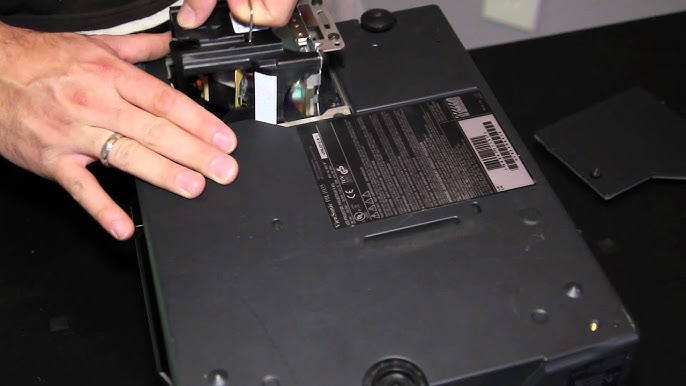
  2. Unscrew 4-8 screws (depending on the model) on the outside perimeter of the backplate with a Phillips screwdriver.
  3. Carefully take out your retaining ring for your gobo followed by your gobo. Clean the gobo with a fine microfiber cloth.
  4. After the backplate is unscrewed, carefully pull the projector straight back out of the aluminum projector housing. It should slide straight out along the side rails.
  5. Clean the projector by blowing out the dust from the fans and heat sink with compressed air. Prevent the fan blades from spinning at high speed when using air, as this may damage the bearings. Gently blow dust from other parts.
  6. Clean inside and outside of the aluminum housing with a damp rag or paper towel and wipe dry.
  7. Visually inspect your projector for any signs of damage. Wire damage is most important to look for, as a bad wire can cause the projector to malfunction.
  8. Now inspect the gobo and clean if necessary. The non-reflective side should only be wiped with a dry and clean microfiber cloth, while the reflective side can be cleaned with glass-safe solvent if needed.
  9. The lens should also be cleaned. To remove the lens, simply loosen the lock ring and turn the lens counterclockwise. Thoroughly clean it with a microfiber cloth, and re-screw the lens into the faceplate. It will need to be re-focused later.
  10. When done, slide the projector back into the projector housing by lining up the two side slots on the front with the two slider rails. Slide straight forward until it’s all the way in place.
  11. Carefully screw in the backplate screws, making sure not to strip them. Once the backplate is tight, the gobo projector is successfully reassembled.
     

    Download a PDF version with visuals for LED10, C-25, C40/40+, and C60/60+ here.

    Download a PDF version with visuals for LEDB90 and B150 here.

    How to Clean Exterior Gobofactory Projector Models:


    1. Always unplug the ECO Spot Gobo Projector and let it cool down before cleaning or maintenance.
    2. Unscrew 4-8 thumb screws on the faceplate. Be careful not to lose your rubber seals and washers.
    3. Carefully take out your retaining clip for your gobo followed by your gobo. Clean the gobo with a fine microfiber cloth.
    4. Clean the front of the projector by blowing out the dust from the gobo holder assembly using compressed air. Then blow out the back of the unit through the fan air slots, removing as much dust from the mesh cage as possible.
    5. Clean the outside of the aluminum housing with a damp rag or paper towel and wipe dry.
    6. Visually inspect your projector for any signs of damage. Wire damage is most important to look for, as a bad wire can cause the projector to malfunction.
    7. Now inspect the gobo and clean if necessary. The non-reflective side should only be wiped with a dry and clean microfiber cloth, while the reflective side can be cleaned with glass-safe solvent if needed.
    8. The lens should also be cleaned. To remove the lens, simply loosen the lock ring and turn the lens counterclockwise. Thoroughly clean it with a microfiber cloth, and re-screw the lens into the faceplate. It will need to be re-focused later.
    9. When done, put the faceplate back on using the rubber seals, washers, and thumb screws.

    Gobo Projector Troubleshooting Cheat Sheet:


    Problem Cause Solution
    Projector gets louder or shuts off mid-use Dust build-up, fan failure Cleaning step #5 (interior); #4 (exterior)
    Specks, smudges, or other blemishes on the projected image Dirty gobo or lens Cleaning steps #8 & #9 (interior); #7 & #8 (exterior)
    After servicing, the projected image is uneven, darker, and hard to focus Misaligned front plate Check if the lens is in line with the gobo, if not, rotate the front plate 180 degrees

    It’s our goal to ensure your projector functions at its best over its entire lifespan, so if you have any questions about cleaning your Gobofactory projector, reach out to customer service at 86 13456752363 for assistance.

Komentujte

Meno
Mail
Komentujte