• 也門(YER ﷼)
  • 土耳其(USD $)
  • 土庫曼斯坦(TMT m)
  • 不丹(BTN Nu.)
  • 中非共和國(XAF ₣)
  • 中國(CNY ¥)
  • 丹麥(DKK kr)
  • 厄瓜多爾(USD $)
  • 厄立特里亞(ERN Nfk)
  • 巴巴多斯島(BBD BBD)
  • 巴布亞新幾內亞(PGK K)
  • 巴西(USD $)
  • 巴拉圭(PYG ₲)
  • 巴林(BHD .د.ب)
  • 巴哈馬(BSD BSD)
  • 巴拿馬(USD $)
  • 巴勒斯坦(ILS ₪)
  • 巴基斯坦(PKR ₨)
  • 文萊(BND B$)
  • 日本(JPY ¥)
  • 比利時(EUR €)
  • 毛里求斯(MUR ₨)
  • 毛里塔尼亞(USD $)
  • 牙買加(JMD $)
  • 乍得(XAF ₣)
  • 以色列(ILS ₪)
  • 加拿大(CAD $)
  • 加納(GHS ₵)
  • 加蓬(XOF Fr)
  • 北馬里亞納群島(USD $)
  • 卡塔爾(QAR ر.ق)
  • 台灣(TWD NT$)
  • 尼日利亞(NGN ₦)
  • 尼日爾(XOF Fr)
  • 尼加拉瓜(NIO C$)
  • 尼泊爾(NPR ₨)
  • 布韋島(USD $)
  • 布基納法索(XOF Fr)
  • 布隆迪(BIF ₣)
  • 瓜德羅普(EUR €)
  • 瓦利斯和福圖納(XPF ₣)
  • 瓦努阿圖(VUV Vt)
  • 白俄羅斯(USD $)
  • 皮特凱恩(NZD $)
  • 立陶宛(EUR €)
  • 伊拉克(USD $)
  • 冰島(ISK Kr)
  • 列支敦士登(CHF ₣)
  • 匈牙利(HUF Ft)
  • 印度(INR ₹)
  • 印度尼西亞(IDR Rp)
  • 危地馬拉(GTQ Q)
  • 吉布提(DJF ₣)
  • 吉爾吉斯斯坦(KGS С̲)
  • 圭亞那(GYD $)
  • 多米尼加(XCD $)
  • 多米尼加共和國(DOP $)
  • 多哥(XOF Fr)
  • 安圭拉(XCD $)
  • 安哥拉(USD $)
  • 安提瓜島和巴布達(XCD $)
  • 安道爾(EUR €)
  • 托克勞(NZD $)
  • 百慕大(BMD BD$)
  • 老撾(LAK ₭)
  • 西班牙(EUR €)
  • 西撒哈拉(MAD د.م.)
  • 佛得角(CVE $)
  • 伯利茲(BZD Be)
  • 克羅地亞(EUR €)
  • 利比里亞(USD $)
  • 利比亞(USD $)
  • 希臘(EUR €)
  • 沙特阿拉伯(SAR ر.س)
  • 貝寧(XOF Fr)
  • 赤道幾內亞(XAF ₣)
  • 亞美尼亞(AMD Դ)
  • 坦桑尼亞(TZS Sh)
  • 委內瑞拉(USD $)
  • 孟加拉(BDT ৳)
  • 岡比亞(GMD D)
  • 帕勞群島(USD $)
  • 所羅門群島(SBD Si$)
  • 拉脫維亞(EUR €)
  • 東帝汶(USD $)
  • 波多黎各(USD $)
  • 波斯尼亞和黑塞哥維那(BAM КМ)
  • 波蘭(PLN zł)
  • 法國(EUR €)
  • 法羅群島(DKK kr)
  • 法屬圭亞那(EUR €)
  • 法屬波利尼西亞(XPF ₣)
  • 法屬南部領地(EUR €)
  • 直布羅陀(GBP £)
  • 肯尼亞(KES Sh)
  • 芬蘭(EUR €)
  • 阿拉伯聯合酋長國(AED د.إ)
  • 阿根廷(USD $)
  • 阿曼(OMR ر.ع.)
  • 阿富汗(AFN Af)
  • 阿森松島(SHP £)
  • 阿塞拜疆(AZN ман)
  • 阿爾及利亞(DZD د.ج)
  • 阿爾巴尼亞(ALL L)
  • 阿魯巴(AWG ƒ)
  • 保加利亞(BGN лв)
  • 俄羅斯(RUB р.)
  • 南非(USD $)
  • 南喬治亞和南桑威奇群島(GBP £)
  • 南極洲(USD $)
  • 哈薩克斯坦(KZT 〒)
  • 柬埔寨(KHR ៛)
  • 洪都拉斯(HNL L)
  • 津巴布韋(USD $)
  • 玻利維亞(BOB Bs.)
  • 科威特(KWD دينار)
  • 科科斯群島(AUD AU$)
  • 科特迪瓦(XOF Fr)
  • 科摩羅(KMF Fr)
  • 突尼斯(USD $)
  • 約旦(USD $)
  • 美國(USD $)
  • 美屬外島(USD $)
  • 美屬薩摩亞(USD $)
  • 英國(GBP £)
  • 英屬印度洋領地(USD $)
  • 香港特別行政區(HKD HK$)
  • 剛果(XAF ₣)
  • 剛果民主共和國(CDF ₣)
  • 哥倫比亞(USD $)
  • 哥斯達黎加(CRC ₡)
  • 埃及(EGP E£)
  • 埃塞俄比亞(ETB Br)
  • 庫克群島(NZD $)
  • 挪威(USD $)
  • 格林納達(XCD $)
  • 格恩西島(GBP £)
  • 格陵蘭(DKK kr)
  • 泰國(THB ฿)
  • 海地(USD $)
  • 烏干達(UGX Sh)
  • 烏克蘭(UAH ₴)
  • 烏拉圭(UYU $)
  • 烏茲別克斯坦(UZS лв)
  • 特立尼達和多巴哥(TTD TTD)
  • 特克斯和凱科斯群島(USD $)
  • 特里斯坦-達庫尼亞(GBP £)
  • 留尼旺島(EUR €)
  • 秘魯(PEN S/)
  • 索馬里(SOS Sh)
  • 紐埃(NZD $)
  • 納米比亞(USD $)
  • 馬耳他(EUR €)
  • 馬里(XOF Fr)
  • 馬來西亞(MYR RM)
  • 馬其頓(MKD ден)
  • 馬拉維(MWK MK)
  • 馬約特島(EUR €)
  • 馬紹爾群島(USD $)
  • 馬提尼克(EUR €)
  • 馬達加斯加(USD $)
  • 馬爾代夫(MVR ރ.)
  • 曼島(GBP £)
  • 基里巴斯(AUD AU$)
  • 密克羅尼西亞(USD $)
  • 捷克共和國(CZK Kč)
  • 梵蒂岡(EUR €)
  • 莫桑比克(USD $)
  • 荷屬安地列斯(USD $)
  • 荷蘭(EUR €)
  • 博茨瓦納(BWP P)
  • 喀麥隆(XAF ₣)
  • 喬治亞(USD $)
  • 幾內亞(GNF ₣)
  • 幾內亞比紹(XOF Fr)
  • 斐濟(FJD FJ$)
  • 斯瓦爾巴和揚馬廷(USD $)
  • 斯里蘭卡(LKR Rs)
  • 斯威士蘭(USD $)
  • 斯洛文尼亞(EUR €)
  • 斯洛伐克(EUR €)
  • 智利(USD $)
  • 湯加(TOP T$)
  • 萊索托(USD $)
  • 菲律賓(PHP ₱)
  • 越南(VND ₫)
  • 開曼群島(KYD $)
  • 黑山(EUR €)
  • 塞內加爾(XOF Fr)
  • 塞舌爾(USD $)
  • 塞拉利昂(SLL Le)
  • 塞浦路斯(EUR €)
  • 塞爾維亞(RSD din)
  • 塔吉克斯坦(TJS ЅМ)
  • 奧地利(EUR €)
  • 奧蘭群島(EUR €)
  • 意大利(EUR €)
  • 愛沙尼亞(EUR €)
  • 愛爾蘭(EUR €)
  • 新加坡(SGD S$)
  • 新西蘭(NZD $)
  • 新喀裡多尼亞(XPF ₣)
  • 瑞士(CHF ₣)
  • 瑞典(SEK kr)
  • 瑙魯(AUD AU$)
  • 聖文森特和格林納丁斯(XCD $)
  • 聖皮埃爾和米克隆群島(EUR €)
  • 聖多美和普林西比(USD $)
  • 聖馬丁(EUR €)
  • 聖馬力諾(EUR €)
  • 聖基茨和尼維斯(XCD $)
  • 聖赫勒拿(SHP £)
  • 聖誕島(AUD AU$)
  • 聖盧西亞(XCD $)
  • 葡萄牙(EUR €)
  • 圖瓦盧(AUD AU$)
  • 福克蘭群島(FKP FKP)
  • 維爾京群島,美屬(USD $)
  • 維爾京群島,英屬(USD $)
  • 蒙古(MNT ₮)
  • 蒙特塞拉特(XCD $)
  • 赫德和麥克唐納群島(AUD AU$)
  • 德國(EUR €)
  • 摩洛哥(MAD د.م.)
  • 摩納哥(EUR €)
  • 摩爾多瓦(MDL L)
  • 緬甸(MMK K)
  • 黎巴嫩(LBP ل.ل)
  • 墨西哥(USD $)
  • 澤西島(GBP £)
  • 澳大利亞(AUD AU$)
  • 澳門特別行政區(MOP P)
  • 盧旺達(RWF ₣)
  • 盧森堡(EUR €)
  • 諾福克(AUD AU$)
  • 韓國(KRW ₩)
  • 薩爾瓦多(USD $)
  • 薩摩亞(WST T)
  • 羅馬尼亞(RON L)
  • 贊比亞(USD $)
  • 關島(USD $)
  • 蘇丹(SDG ج.س.)
  • 蘇里南(USD $)
/ /

DIY Guide: Creating a Gobo for Photography

Jun 22,2023 | JINGYU OPTOELEC
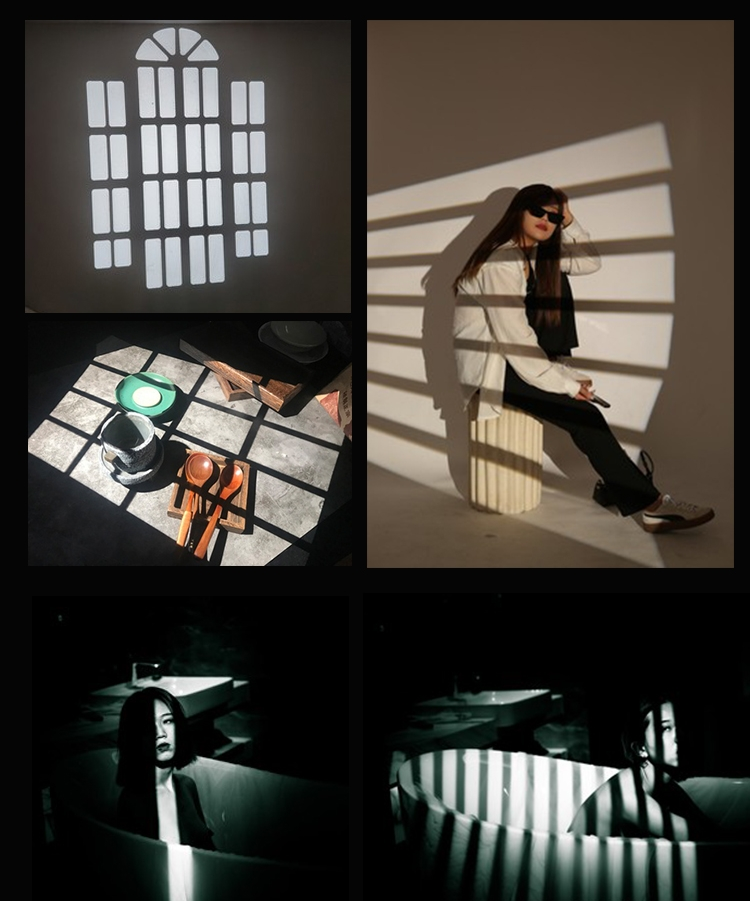
Gobos are invaluable tools in photography that allow photographers to control and manipulate light to achieve specific effects. While there are commercially available gobos, creating your own custom gobo can offer a unique touch to your images. In this article, we will provide a step-by-step guide on how to make a gobo for photography, enabling you to explore your creativity and experiment with different lighting effects.

Materials Needed:

  1. Sturdy material: Choose a material that can withstand heat from the light source. Metal, such as aluminum or steel, is commonly used due to its durability and heat resistance. Alternatively, heat-resistant plastic or glass can also be used.

  2. Cutting tools: Depending on the material, you may need a metal cutter, tin snips, a craft knife, or glass-cutting tools. Ensure you have the appropriate tools for your chosen material.

  3. Design template: Create or find a design template that suits your desired lighting effect. This can be a pattern, a shape, or a logo. You can draw your design freehand, print it out, or use a stencil.

  4. Safety equipment: When working with metal or glass, ensure you have safety goggles, gloves, and appropriate protective gear to prevent injury.

Step-by-Step Guide:

  1. Choose your material: Select the material that suits your requirements and desired effect. Metal provides durability and can withstand higher temperatures, while glass offers a translucent quality. Ensure the material is sized appropriately for your lighting setup.

  2. Create or obtain your design: Determine the design you want to project using your gobo. It can be a pattern, a shape, or even a custom logo. Sketch the design on paper, or use graphic design software to create a digital template. If using a stencil, print it out or have it professionally made.

  3. Transfer the design: Place your design template onto the material and trace the outline with a marker or pencil. Ensure the design is centered and aligned correctly.

  4. Cut out the gobo: Using the appropriate cutting tools for your chosen material, carefully cut along the traced outline. Take your time and make precise cuts to achieve the desired shape. Be cautious when working with sharp tools and follow safety guidelines.

  5. Refine the edges: After cutting out the gobo, smooth any rough or jagged edges using sandpaper or a file. This step ensures that the gobo is safe to handle and won't cause injury or damage to equipment.

  6. Test the gobo: Place your homemade gobo in front of a light source, such as a studio strobe or a flashlight, and observe the projected pattern or shape. Make any necessary adjustments to the design or material thickness to achieve the desired effect.

  7. Fine-tune and experiment: Once you have created your gobo, you can experiment with different lighting setups and techniques. Test various distances between the light source and the gobo, try different angles, and observe how the projected pattern or shape changes. This experimentation will allow you to discover unique lighting effects and expand your creative possibilities.

Conclusion: Creating your own gobo for photography opens up a world of possibilities for controlling and shaping light in your images. By following this step-by-step guide, you can craft a custom gobo that suits your creative vision. Remember to prioritize safety when working with cutting tools and select appropriate materials for your intended lighting setup. With your homemade gobo, you can experiment, refine, and create stunning lighting effects that add depth, interest, and uniqueness to your photographs. Embrace the process, let your creativity flow, and enjoy the new realm of lighting possibilities that your DIY gobo brings.

發表評論
姓名
郵件
評論